In a early post we've been talking about autocommitted objects in Mendix. Objects that have been automatically committed because of an association. But what do you do when then objects aren't used anymore? Actually delete or rollback the objects.
In the Domain Model you can set the delete behavior on associations. In the most cases the behavior is set to delete the associated objects as well. For each object Mendix will delete all objects that are associated. So with deleting one object you can delete a complete hierarchy of associated objects.

The delete behavior isn't only used for deleting objects, but also in a certain way for a rollback of an object. The setting is only used with a rollback of an instantiated object: a newly created object that haven't been committed yet.
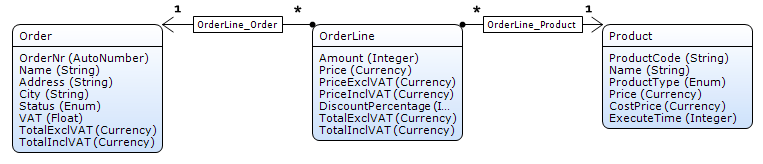
I've created a simple example project based on order management. The domain model is very simple with an 'Order', 'Orderline' and 'Products'. In testing the scenario the default Mendix functionality will be used, no custom created microflows. So the scenario:
Summarizing: Mendix works with objects that are connected with associations. Mendix doesn't know the logic hierarchy of objects that we know and program. If Mendix has to delete or rollback an object it only occurs on that instance, other objects aren't changed. The delete behavior on associations is really important to have a clean database.
In the Domain Model you can set the delete behavior on associations. In the most cases the behavior is set to delete the associated objects as well. For each object Mendix will delete all objects that are associated. So with deleting one object you can delete a complete hierarchy of associated objects.
The delete behavior isn't only used for deleting objects, but also in a certain way for a rollback of an object. The setting is only used with a rollback of an instantiated object: a newly created object that haven't been committed yet.
I've created a simple example project based on order management. The domain model is very simple with an 'Order', 'Orderline' and 'Products'. In testing the scenario the default Mendix functionality will be used, no custom created microflows. So the scenario:
- An 'Order' is instantiated.
- Some 'Orderlines' are added and committed (the 'Order' will be autocommitted)
- The 'Order' will be cancelled: executing a rollback.
| No association delete behavior | With association delete behavior |
|

|
| The 'Order' has properly been cleared, nothing in my database, but the created 'Orderlines' are still be present. |
The 'Orderlines' are perfectly deleted and I have never explicit deleted. Based on the association delete behavior Mendix will delete them on a rollback. |

|

|
Summarizing: Mendix works with objects that are connected with associations. Mendix doesn't know the logic hierarchy of objects that we know and program. If Mendix has to delete or rollback an object it only occurs on that instance, other objects aren't changed. The delete behavior on associations is really important to have a clean database.


